
Connascent Car Rental
Run your car rental from Chrome
Fleet, bookings, Albanian taxes and alerts in one place. Your data stays in your own Google Sheet.
Google Chrome (desktop)
0.2.0
Early access
You need Google Chrome on a computer and a Google account.
 3
Everything a small rental business tracks
Cars, customers, taxes and services in one app, with an alert before anything slips.
Fleet with Albanian documents and taxes
Every car keeps its Kolaudim, Sigurimi TPL, TVMP, TVML, Taksa e qarkullimit, Kasko, Karta jeshile and warranty dates. You get an alert before each one expires, and one click renews the ones you paid for another year.
Bookings with a live price
Pick a car and dates and the total updates as you type. Price each booking in EUR or Lek, per day or as a total. The app stops you from booking the same car for overlapping dates; a return and a pick-up on the same day are fine.
Check-out and return with km
Hand the car over with one click and write down the odometer when it comes back. The car's km update by themselves.
Service history and service-due alerts
Log oil changes, tyres, brakes and repairs with km and cost. Set the km of the next service and get a "Service due" alert as the car gets close.
Dashboard, toolbar badge and daily reminder
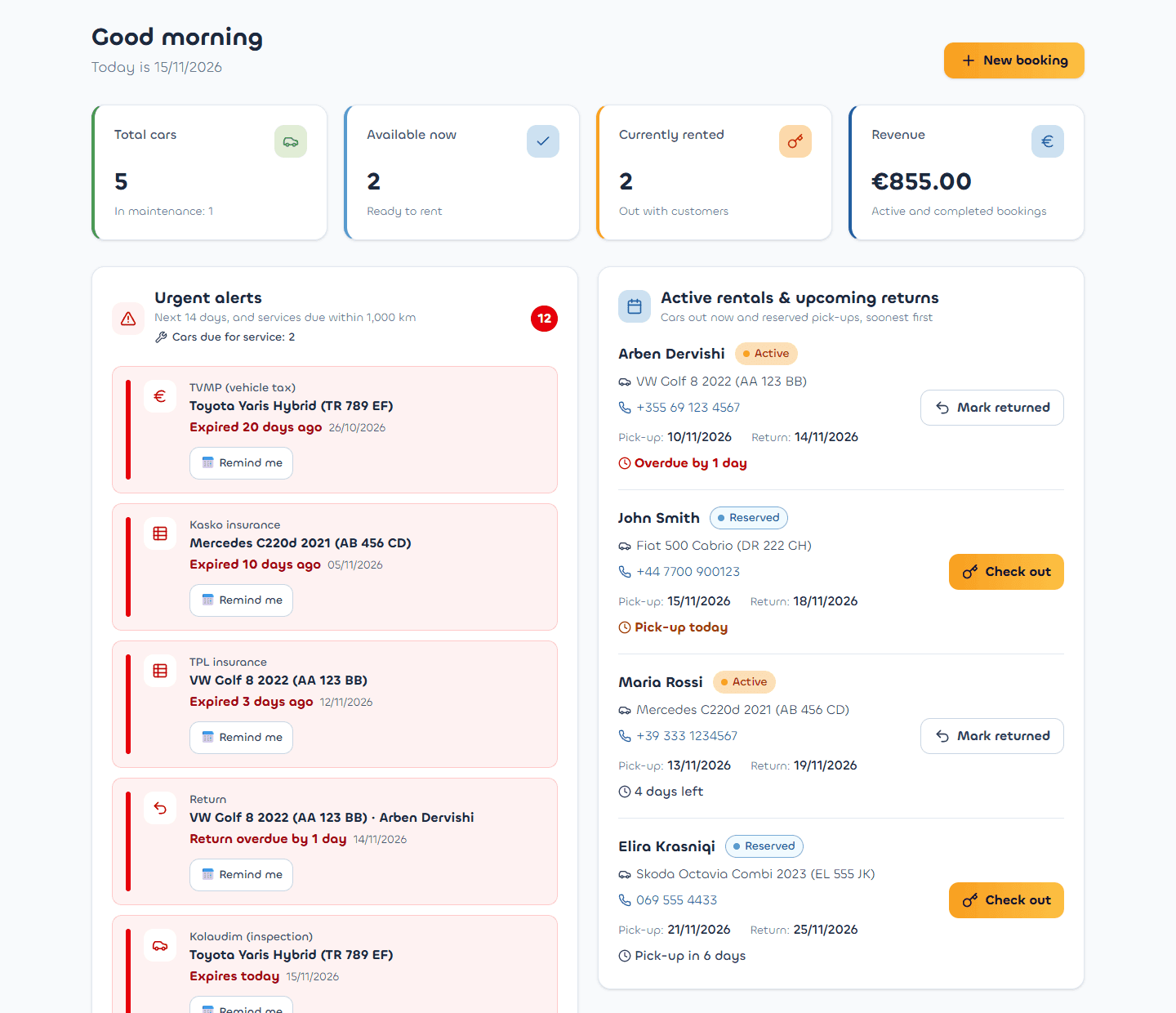
The dashboard opens on what is urgent: expiring documents, overdue returns and today's pick-ups. A red number on the Chrome icon shows how many things need attention, and one reminder arrives each day.
More than one business
Run several rental businesses from the same Google account. Each one has its own Google Sheet, and you switch between them in a click.
Shared sheet and Activity log
Share the sheet with your staff. Settings shows who has access, and the Activity tab shows who added, changed or returned what, and when.
English or Albanian, euro or lek
Switch the whole app between English and Albanian, work in EUR or ALL, and see every date as dd/mm/yyyy.
See it before you try it
Real screens from the app, with sample data.
Dashboard: urgent alerts, cars out now and today's pick-ups
Your data stays yours
There is no Connascent server in between. The app talks only to Google, with your own account.
Saved in your own Google Drive
Each business is one Google Sheet in your Drive, named after the business, for example "Rent a Car Tirana · Connascent Car Rental". You can open it, print it or download it at any time.
Access only to its own files
The app uses Google's drive.file permission: it can open only the files it created itself, and nothing else in your Drive.
Connascent can't see your customers
Your cars, customers and prices travel only between your Chrome and Google. We never receive them.
Up and running in three steps
No server to set up and no database to rent. Your Google account does the storing.
Install the extension in Chrome
During early access we send you the install package and a short guide. It takes about 5 minutes.
Connect Google and name your business
Click Connect with Google, allow access, and type your business name. The app creates your Google Sheet in your Drive.
Add your cars and bookings
Enter your fleet with its tax and insurance dates, then your bookings. The dashboard, the toolbar badge and the daily reminder take it from there.
How to install
While the app is in early access, it is installed from a folder we send you rather than from the Chrome Web Store. Here is what that looks like.
You need
- Google Chrome on a desktop or laptop computer
- A Google account, signed in to Chrome itself (a Gmail tab is not enough)
- About 5 minutes
"Disable developer mode extensions"?
Chrome sometimes shows this when it starts, for every extension not installed from the Chrome Web Store. It's normal: close it with the X and don't click Disable.
Updating
When we send a new version, replace the folder's contents with the new zip and click reload on chrome://extensions. Your data is not lost: it lives in Google Drive, not in the folder.
Steps
- 1
Unzip to a permanent folder
Extract the zip into your Documents folder. Don't delete or move that folder later: Chrome runs the app from it.
- 2
Load it in Chrome
Open chrome://extensions, turn on Developer mode (top right), click Load unpacked and choose the Connascent Car Rental folder.
- 3
Pin the icon
Click the puzzle-piece button in the Chrome toolbar, then the pin next to Connascent Car Rental.
- 4
Connect your Google account
Click the icon, then Connect with Google. Choose your account and click Allow. Google shows that the app can only reach the files it creates.
- 5
Create your business
Type your business name and click Create my business. Your Google Sheet is created, and you can start adding cars.
Stuck on a step? Write to hello@connascent.com and we'll walk you through it.
Frequently asked questions
Short answers to what rental owners ask us most.
No. The app saves to Google Sheets, so it needs an internet connection. If the connection drops, what you already saved is safe in your sheet, and the toolbar badge keeps showing the last alerts it knew about.
Request early access
Tell us about your business. Your email app opens with the request ready to send, and we reply with the install package and the next steps.